OpenAI API — Bare-Bones Node.js Setup
Get started from scratch with a simplified API request, whether you’re launching a new project or testing the OpenAI API.


Before we jump in. 👇 Here’s the source code for your reference:
Start By Creating an open OpenAI account and getting your API key:
Visit https://platform.openai.com/ and sign up for an account.
Click on Dashboard tab, then 🔒API Keys on the left nav.
Locate ‘+ Create new secret key’ and generate your key.
Setting Up Your Project:
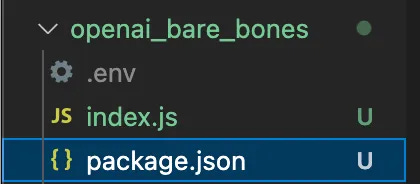
Create your project folder and add the following files:
package.json
.env
index.js
Here’s a snapshot of my folder…
Copy and paste the following code into your .env file, and replace YOUR_API_KEYS with the key you created on your OpenAI account. 🔥
# Do not share your OpenAI API key with anyone! It should remain a secret.
OPENAI_API_KEY=YOUR_KEY
Make sure to include a
.gitignorefile and add.envto it if you're publishing to GitHub.
Now, copy and paste the following code into your package.json file:
{
  "name": "openai_bare_bones",
  "version": "0.1.0",
  "private": true,
  "openai": "^4.0.0",
  "type": "module",
  "scripts": {
    "start": "node index.js"
  },
  "dependencies": {
    "dotenv": "^16.3.1",
    "openai": "^3.3.0"
  },
  "engines": {
    "node": ">=14.6.0"
  }
}
Finally, copy and paste the following code into your index.js file…
import { Configuration, OpenAIApi } from "openai"
import * as dotenv from 'dotenv'
dotenv.config()

const configuration = new Configuration({ apiKey: process.env.OPENAI_API_KEY })
const openai = new OpenAIApi(configuration)

const start = async function() {

  const response = await openai.createCompletion({
    model: "gpt-3.5-turbo-instruct",
    prompt: "What chemical compounds are computers mostly made from?",
    temperature: 0.6,
    max_tokens: 256,
  });

  console.log('Response Text', response.data.choices[0].text)
}
start()
Time to Get It Running!
First install the node dependencies…🏗️
npm install
And, Run the code….🚀
npm start
NOTE: If you receive an error about “exceeded your current quota” you may need to go to “Billing” section and add to your balance.
You should now see a response for your prompt. If you didn’t change the code, it’ll be info about the chemical compounds contained in a computer. 🤓
What’s Happening Here? Let’s talk about the code
index.js
The meat of what we’re doing is in the request/response section of this file where we’re making a request to OpenAI:
const response = await openai.createCompletion({
  model: "gpt-3.5-turbo-instruct",
  prompt: "What chemical compounds are computers mostly made from?",
  temperature: 0.6,
  max_tokens: 256,
});
The
temperatureparameter affects randomness. A higher value (closer to 1) will make outputs more random, whereas a lower value (closer to 0) will make outputs more deterministic.The
max_tokensparameter limits the length of the response to 256 tokens.
Package.json
name: 📛 Whatever we decided to call our project “openai_bare_bones”.
version: 🏷️ Keeps track of what version were on.
private: 🤫 Set to
true, which means npm will refuse to publish it.openai: 🤖 version of Open AI we’re using.
type: 📘 By setting this to “module”, we’re stepping into the modern ECMAScript module world. Fancy!
scripts: 🚀 command-line shortcut!
dependencies: 🧩 source code we need to include to run our application:
dotenv: Environment variables gatekeeper, handling.envfile withprocess.env.openai: 🧠 Version "^3.3.0". openai version.engines: 🚂 Make sure we’re on Node.js version “14.6.0” or a newer, model.
Cheers 🍻,
- Bob
